


Those stacks on the desk. A file cabinet that barely closes. A bill you know you kept… but where? Imagine all these papers were securely stored for easy retrieval — just the click of a few buttons.
Many Americans are asking themselves how to go paperless. For most people, “paperless” really means paper-light. And with less clutter, faster access, better security, and easier sharing, it’s usually a relief. It’s also a relief to know you don’t have to do it all at once. Start with a few smart changes, and build from there.
Jump to:
- Why Go Paperless? The Benefits for Business and Home
- Step-by-Step: Business Office
- Step-by-Step: Home Office
- What Should You Go Paperless With?
- What NOT to Do
- When You Still Need Paper
- Ready to Clear Out the Old Paper?
Why Go Paperless? The Benefits for Business and Home
For businesses
Paper slows things down (and costs you money while it does). Files can be misfiled and versions mixed up. Someone wastes time searching a cabinet when they could have searched digitally in seconds.
In a paper-light office, things run more smoothly with:
- Faster workflows
- Easier collaboration (even remotely)
- Fewer lost documents
- Better visibility into who has access to what
And there’s another big one — it can also reduce risk. Paper files sitting in open cabinets or tossed in the trash can expose sensitive information. Retention and compliance requirements vary by industry and there may be some papers you need to keep, but digital systems often make tracking and retrieval easier and faster. (For retention rules that apply to your situation, check with your financial or legal advisor.)
The bottom line? Done well, going paperless protects your time and reputation, putting dollars back in your pocket.
For home offices and households
At home, paper hides in mail piles, cluttering kitchen counters or bursting out of overstuffed folders. Tax time can mean lost hours just tracking down paperwork.
On the other hand, wouldn’t it feel great to have less daily clutter? Imagine a simpler tax time, quick access during emergencies and no digging through drawers for a warranty.
It’s about calm and convenience. More time, less frazzle. Even if your paperwork is organized enough to rival your lawyer’s filing system, less paper means less storage. And more space for other things. Now don’t we all need a little more of that?
Step-by-Step: How to Go Paperless in a Business Office
Step 1: Identify your “paper hotspots”
Start where paper piles up fastest. For you, maybe that’s HR files, onboarding packets, invoices or accounts payable. Or do you keep customer records, vendor contracts and receipts? What about mailroom sorting areas?
Pick one department to pilot first. Small wins build momentum.
Step 2: Create a simple “digital-first” policy
From today onwards, new documents begin digitally (using steps 3, 4, 5 and 6). That might mean setting up e-signatures, using PDFs instead of printed drafts, or uploading files directly to shared folders.
Create an exceptions list for documents that must remain paper for legal, regulatory, or operational reasons. For retention rules that apply to your situation, always check with your financial advisor.
Be careful not to be overly rigid about things though (aside from the legal requirements), aim for the transition to be realistic. Small steps made by your team will add up fast.
Step 3: Set up a folder structure and naming rules
In going paperless, your first consideration for digital scanning should be your naming system. Scanning without naming rules creates digital chaos that nobody can keep track of — not even Frank from accounts. Keep folders simple. For example:
- HR
- Finance
- Clients
- Vendors
- Operations
Then use a consistent naming format for each file, like:
YYYY-MM-DD_Department_DocumentType_Client.pdf
Example:
2026-03-01_Finance_Invoice_ABCCompany.pdf
Simple naming beats perfect naming. It just needs to be logical and consistent.
Step 4: Choose your workflow: scan, index, store, retrieve
Decide where your files will live — a secure shared drive or a document management system — then work out how you’ll find them. Maybe you’ll index by client name and tag by invoice number. Whatever system makes sense for your business, just keep it consistent.
If your office needs a reliable way to digitize and organize records, document imaging can make retrieval and sharing dramatically easier. Scanning is only half the job. Quick and easy retrieval is the goal.
Let us do the hard work for you — shred confidently, scan securely and protect with precision using Paper Pros.
Step 5: Lock down access to protect sensitive docs
Digital doesn’t automatically mean secure. Consider using:
- Role-based permissions (HR files aren’t for everyone)
- Strong passwords
- Multi-factor authentication (a second login step, like a code to your phone)
- Limited admin access
Backups matter too. A simple 3-2-1 rule works well: three copies of critical files, two different types of storage, one stored separately. Backups protect you from hardware failure, accidental deletion, or ransomware.
Step 6: Train the team and make adoption stick
This is your other most critical step. Your people will make or break this, so make sure your team is fully onboard. Even the best systems fail when habits don’t change.
Encourage them to default to PDF, create (and learn to use) an e-signature and to upload things immediately instead of later. Always use that one shared naming format, and you could even consider a designated scanning station.
Common failure points include inconsistent naming, scanning everything with no indexing, and having no retention plan in place. (For retention rules that apply to your situation, always check with your financial or legal advisor.)
Step-by-Step: How to Go Paperless in a Home Office (and Household)
Step 1: Start with easy wins
Switch recurring documents first because they require the least effort and create immediate clutter relief.
- Bank statements
- Utilities
- Credit cards
- Insurance
- School papers
Step 2: Set up a simple digital filing cabinet
Create clear top-level folders such as:
- Identity
- Taxes
- Medical
- Home
- Auto
- Financial
- Receipts/Warranties
- Kids/School
- Pets
Use a simple naming rule like:
2026-05-UtilityBill_Electric.pdf
Remember, you don’t need perfection. Keep it simple, memorable, and aim for easy retrieval.
Step 3: Build a weekly paper routine
Like most things, once you make it a habit then it feels easier. Set up a new routine and trial it for six weeks. When mail arrives, sort it immediately based on what you need to do:
- Action
- Scan
- Shred
- Recycle
Keep a small “to scan” tray and clear it weekly. A 10-minute habit can prevent those decorative pileups at the end of the counter.
Step 4: Don’t digitize blindly — know what to keep
Of course, some originals should stay paper: birth certificates, passports, certain signed legal documents, irreplaceable records.
Most other things can usually be scanned and shredded when appropriate, and, yes, we’re going to say it again — for retention rules that apply to your situation, always check with your financial or legal advisor.
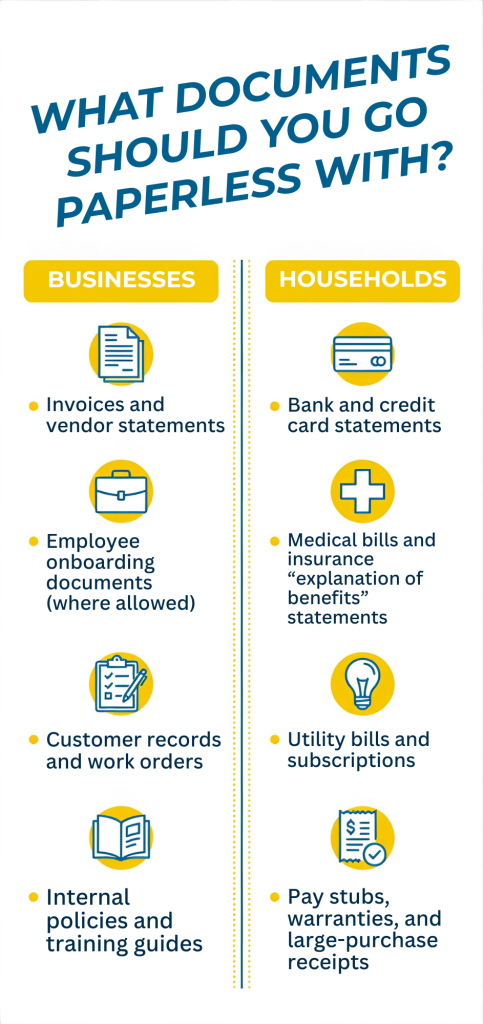
What Documents Should You Go Paperless With?
For businesses:
- Invoices and vendor statements
- Employee onboarding documents (where allowed)
- Customer records and work orders
- Internal policies and training guides
These are recurring, high-volume, and easier to retrieve digitally.
For households:
- Bank and credit card statements
- Medical bills and insurance “explanation of benefits” statements
- Utility bills and subscriptions
- Pay stubs, warranties, and large-purchase receipts
These are often needed quickly — and easier to store digitally than in a drawer.
What NOT to Do When Going Paperless
- Scan everything without a naming or indexing plan
- Ignore retention requirements or legal realities (for retention rules that apply to your situation, check with your financial or legal advisor)
- Throw sensitive documents in the trash
- Rely on one device with no backups
Trash isn’t secure. Identity theft and business fraud can start with improperly discarded paperwork. Not sure what’s safe to toss and what should be destroyed? This guide can help you decide what to shred.
When You Still Need Paper (Yes, Sometimes You Do)
Going paperless doesn’t mean eliminating paper entirely. For businesses, certain original contracts, regulatory documents, or industry-specific records may need to be retained in physical form for legal or operational reasons. Retention rules vary, so confirm requirements with your financial or legal advisor.
When that’s the case, store originals in a clearly labeled, secure location and keep a digital copy for quick reference.
For households, documents like birth certificates, passports, property deeds, and certain signed legal agreements are usually best kept as originals in a fire-resistant, secure place. A digital backup adds convenience, but it can’t replace the physical copy.
So, your goal isn’t zero paper. You’re becoming intentional about it. When you know why you’re keeping something (and where it lives) it’s no longer clutter. You start feeling organized. A hybrid approach is practical and paper-light is progress.
Ready to Clear Out the Old Paper?
Once you’ve digitized what you need, the final step is secure disposal. Simply tossing documents in the trash leaves personal and financial information at risk.
Shredding protects your sensitive information and reclaims space — in offices and at home. Here’s what shredding typically costs.
If you’re ready to make the transition easier, reach out today for a quote and a chat. We can take secure shredding off your hands or provide full paper management services in Nevada — call us at (702) 564-7400. A cleaner, more secure workspace is closer than you think.